Adding Manual ROIs
This page documents the Suite2p 1.x manual ROI workflow used on the PACE
interactive desktop, including the compatibility helpers for editing older
pipeline output folders such as qc_results/ and manual_qc_results/.
Note
New sessions should not create separate qc_results/ or
manual_qc_results/ directories by default. Those folder layouts are
legacy compatibility targets for older workflows. For new sessions, review
and label ROIs in the interactive HTML reviewer whenever possible.
The goal is to keep Suite2p's GUI edits and the downstream QC folder naming conventions synchronized:
- Suite2p GUI expects
stat.npy,F.npy,Fneu.npy,spks.npy,iscell.npy,ops.npy, anddata.binin onesuite2p/plane0-style folder. - Some older pipeline outputs store the same core arrays as
stat.npy,fluo.npy,neuropil.npy, andmasks.npyinqc_results/ormanual_qc_results/. - The helpers in
utils_2p.manual_roiscreate a temporary Suite2p-compatible workspace, let the GUI modify that workspace, then export the edits back to the older QC folder names.
Warning
Manual ROI edits change ROI-indexed inputs. Any downstream files or analysis
products that depended on the older stat.npy, fluorescence traces,
neuropil traces, masks, or ROI order must be regenerated or checked before
they are trusted.
Step 1: Prepare Suite2p-compatible inputs
Manual ROI extraction needs a Suite2p-compatible working folder. The GUI can
load ROI masks from stat.npy alone, but it cannot extract fluorescence for a
new manual ROI unless the working folder also has trace files, settings, and
the registered movie binary.
Required folder structure
For a normal Suite2p output folder, the expected structure is:
session/
└── suite2p/
    └── plane0/
        ├── stat.npy
        ├── F.npy
        ├── Fneu.npy
        ├── spks.npy
        ├── iscell.npy
        ├── ops.npy
        └── data.bin
For older QC outputs, the source folder may instead look like:
session/
├── suite2p/
│   └── plane0/
│       ├── ops.npy
│       └── data.bin
└── manual_qc_results/
    ├── stat.npy
    ├── fluo.npy
    ├── neuropil.npy
    ├── masks.npy
    ├── dff.h5
    ├── denoised_dff.h5
    └── spikes.h5
In this case, create a temporary Suite2p-style directory before opening the GUI.
Create Suite2p GUI compatible directory
Older postprocessing folders may not contain Suite2p's expected GUI filenames.
Create a temporary workspace from qc_results/ or manual_qc_results/ before
opening the GUI:
python - <<'PY'
from utils_2p.manual_rois import create_manual_roi_workspace

result = create_manual_roi_workspace(
    qc_dir="/path/to/session/manual_qc_results",
    suite2p_plane_dir="/path/to/session/suite2p/plane0",
    workspace_dir="/path/to/session/manual_roi_workspace",
)
print(result)
PY
This creates a workspace with Suite2p's expected names:
manual_roi_workspace/
├── stat.npy        # copied from qc_dir/stat.npy
├── F.npy           # copied from qc_dir/fluo.npy
├── Fneu.npy        # copied from qc_dir/neuropil.npy
├── spks.npy
├── iscell.npy
├── ops.npy
├── data.bin        # symlinked by default
└── manual_roi_workspace_source.txt
If data.bin was generated on scratch, make sure the Suite2p plane directory
passed as suite2p_plane_dir has a valid data.bin symlink before creating the
workspace. The helper symlinks that binary into the temporary GUI-compatible
directory so Suite2p can extract fluorescence from the manual ROI.
Required data.bin
Suite2p manual ROI extraction needs access to the registered movie binary:
suite2p/plane0/data.bin
If data.bin is missing, the manual ROI GUI can load the masks but cannot
extract fluorescence for the new ROI. In that case, regenerate or restore the
binary before extracting the ROI.
If the binary exists elsewhere, a symlink is enough:
ln -s /path/to/existing/data.bin /path/to/session/suite2p/plane0/data.bin
For future pipeline jobs generated by utils_2p.processing_pipeline,
preserve Suite2p binaries during the Suite2p stage with:
python -m utils_2p.processing_pipeline \
  --session /path/to/raw/session \
  --output-root /path/to/processed/output/root \
  --suite2p-version 1.x \
  --keep-suite2p-bin
Build data.bin from TIFFs only
Many manual ROI edits happen after a session has already been processed and the
original data.bin has been deleted. In that case, prebuild only the Suite2p
binary from the raw TIFFs instead of rerunning the whole preprocessing pipeline.
Run the prebuild helper with the processed session path, the raw TIFF folder,
and the output root. If the session was generated by the newer preprocessing
pipeline, its existing metadata is detected and reused. If not, temporary
metadata is generated from suite2p/plane0/ops.npy and used internally.
/storage/project/r-fnajafi3-0/shared/shared_envs/2p_processing_suite2p_1x/bin/python \
  -m utils_2p.scripts.prebuild_suite2p_binary_parallel \
  --processed-session /path/to/processed/session \
  --raw-path /path/to/raw_tiff_folder \
  --output-root /path/to/output_root \
  --workers 8 \
  --batch-size 5000 \
  --target-structure dendrite \
  --force
This writes:
/path/to/output_root/<session_name>/suite2p/plane0/data.bin
/path/to/output_root/<session_name>/suite2p/plane0/data_chan2.bin  # two-channel only
/path/to/output_root/<session_name>/suite2p/plane0/db.npy
/path/to/output_root/<session_name>/suite2p/plane0/settings.npy
Binary size
Suite2p binaries are raw int16 movies and are often large. Approximate
size is:
frames * Ly * Lx * 2 bytes * number_of_saved_channels
For a 512 x 512 movie, one channel is about 0.5 MB per frame. A 20,000 frame recording is about 9.8 GB for one channel or 19.5 GB for two channels. At 30 Hz, one hour is 108,000 frames, about 53 GB for one channel or 106 GB for two channels. Build these files on PACE scratch when possible, and only symlink or copy them into project/shared storage when they are needed for Suite2p GUI work.
The preferred workflow is to write the .bin files to scratch, which has
much larger storage limits and faster read/write I/O, then symlink them into
the Suite2p folder you open in the GUI. This keeps project/CEDAR storage
from filling with large duplicate binaries while still letting Suite2p find
data.bin next to the stat.npy you are editing.
ln -s ~/scratch/.../<session>/suite2p/plane0/data.bin \
  /path/to/gui/session/suite2p/plane0/data.bin

# Two-channel sessions also need the second channel binary.
ln -s ~/scratch/.../<session>/suite2p/plane0/data_chan2.bin \
  /path/to/gui/session/suite2p/plane0/data_chan2.bin
The current prebuild helper is intended for single-plane TIFF inputs. It
supports both one-channel recordings and the two-channel Bruker-style OME-TIFF
layout used in this repo, where files are paired by Ch1 and Ch2 in the
filename. For two-channel sessions the helper writes data.bin for the
functional channel and data_chan2.bin for the other channel, following
Suite2p's own convention. Multi-plane sessions still need the normal Suite2p
pipeline path or separate validation before manual ROI extraction.
The same conversion is available from Python:
from pathlib import Path

from utils_2p.scripts.prebuild_suite2p_binary_parallel import prebuild

raw_tiffs = Path("/path/to/raw_tiff_folder")
processed_session = Path("/path/to/processed/session")
output_root = Path("/path/to/output_root")

prebuild(
    processed_session,
    raw_tiffs,
    output_root,
    workers=8,
    batch_size=5000,
    force=True,
    target_structure="dendrite",
)
The helper infers nchannels, functional_chan, denoise, spatial_scale,
input_format, fs, and tau from an old ops.npy when no newer metadata is
found. Set target_structure to the same class of Suite2p config that was used
for the session, usually neuron or dendrite.
For one-channel sessions, the output contains only data.bin. For two-channel
sessions, nchannels and functional_chan are read from the existing pipeline
metadata or suite2p/plane0/ops.npy; there is no separate command-line flag for
channel count. If functional_chan=2, Ch2 is written to data.bin and the
matching Ch1 files are written to data_chan2.bin. If functional_chan=1,
the opposite mapping is used. Keep both binary files together when opening the
session in Suite2p, especially if registration or display depends on the
anatomical channel.
Two-channel conversion expects matched channel files in the same raw TIFF
folder. For Bruker OME-TIFFs, this means a matching Ch1 and Ch2 file for
each file index. Missing or mismatched channel files should be fixed before
conversion rather than ignored, because otherwise Suite2p can load the wrong
channel or frame count.
The direct Python CLI uses the same interface:
/storage/project/r-fnajafi3-0/shared/shared_envs/2p_processing_suite2p_1x/bin/python \
  -m utils_2p.scripts.prebuild_suite2p_binary_parallel \
  --processed-session /path/to/processed/session \
  --raw-path /path/to/raw_tiff_folder \
  --output-root /path/to/output_root \
  --workers 8 \
  --batch-size 5000 \
  --target-structure dendrite \
  --force
Step 2: Add Manual ROIs in Suite2p GUI
After the Suite2p-compatible input directory is prepared, use the patched
Suite2p GUI on a PACE interactive desktop to draw, extract, and save the manual
ROI. The same GUI workflow is used whether you are editing an original
suite2p/plane0 folder or a temporary GUI-compatible workspace.
Repository and helper access
The current recommended workflow is to use a Conda environment where
utils_2p is installed as a package. The shared PACE environment is:
/storage/project/r-fnajafi3-0/shared/shared_envs/2p_processing_suite2p_1x/bin/python
Check that the helper package is importable:
/storage/project/r-fnajafi3-0/shared/shared_envs/2p_processing_suite2p_1x/bin/python \
  -c "import utils_2p; print(utils_2p.__file__)"
The source code remains on GitHub for development, review, and rebuilding environments:
https://github.com/najafi-laboratory/2p_imaging
Clone or update the repository only when you need to edit helper code or build a new environment:
git clone https://github.com/najafi-laboratory/2p_imaging.git
cd 2p_imaging
git checkout main
git pull --ff-only
Start the interactive desktop
Open a PACE interactive desktop through the PACE OnDemand dashboard. You must be connected to the Georgia Tech VPN to access the dashboard.
Launch the patched Suite2p GUI
On the interactive desktop, launch the patched Suite2p 1.x GUI with the full path to the shared patched environment:
/storage/project/r-fnajafi3-0/shared/shared_envs/suite2p_1gui/bin/suite2p
Use this specific Suite2p 1.x installation for manual ROI work instead of a generic Suite2p 1.x install. The manual labelling flow has local patches for GUI extraction, ROI statistics, and manual mask display behavior that are not present in the unpatched PyPI install.
Users can optionally create their own shorter symlink in their home directory:
ln -s /storage/project/r-fnajafi3-0/shared/shared_envs/suite2p_1gui ~/suite2p1_gui
Then launch through the symlink:
~/suite2p1_gui/bin/suite2p
The ~ path resolves to the current user's home directory, so each user can
make their own shortcut without depending on another user's home-directory
symlink.
The lab shared directory may also contain compatibility aliases named
suite2p1_gui or s2p_gui, but new instructions should use suite2p_1gui so
the name is unambiguous.
You can verify the active executable from the terminal with:
hash -r
which suite2p
python -c "import sys; print(sys.executable); import suite2p.gui.drawroi as d; print(d.__file__)"
Expected GUI environment paths should point to either the full patched
environment path above or to a user-created ~/suite2p1_gui symlink that points
to that same environment.
Add the ROI in the GUI
In the Suite2p GUI, open the working folder with File -> Load processed
data. Navigate to the session data directory that contains the target
suite2p/plane0/ folder, or to the temporary manual_roi_workspace/ directory
created above for older qc_results/ or manual_qc_results/ outputs. The
directory you open should contain the Suite2p-compatible files described in
Step 1, including stat.npy, ops.npy, trace arrays, and a valid data.bin
when fluorescence extraction from new ROIs is needed.
Common storage roots to check for hosted sessions include:
# Cedar long-term storage
/storage/cedar/cedar0/cedarp-fnajafi3-0/2p_imaging/

# PACE project/shared storage
/storage/project/r-fnajafi3-0/
/storage/project/r-fnajafi3-0/shared/2P_Imaging/

# PACE scratch processing outputs, if the session has not yet been copied back
~/scratch/2p_processing_results/
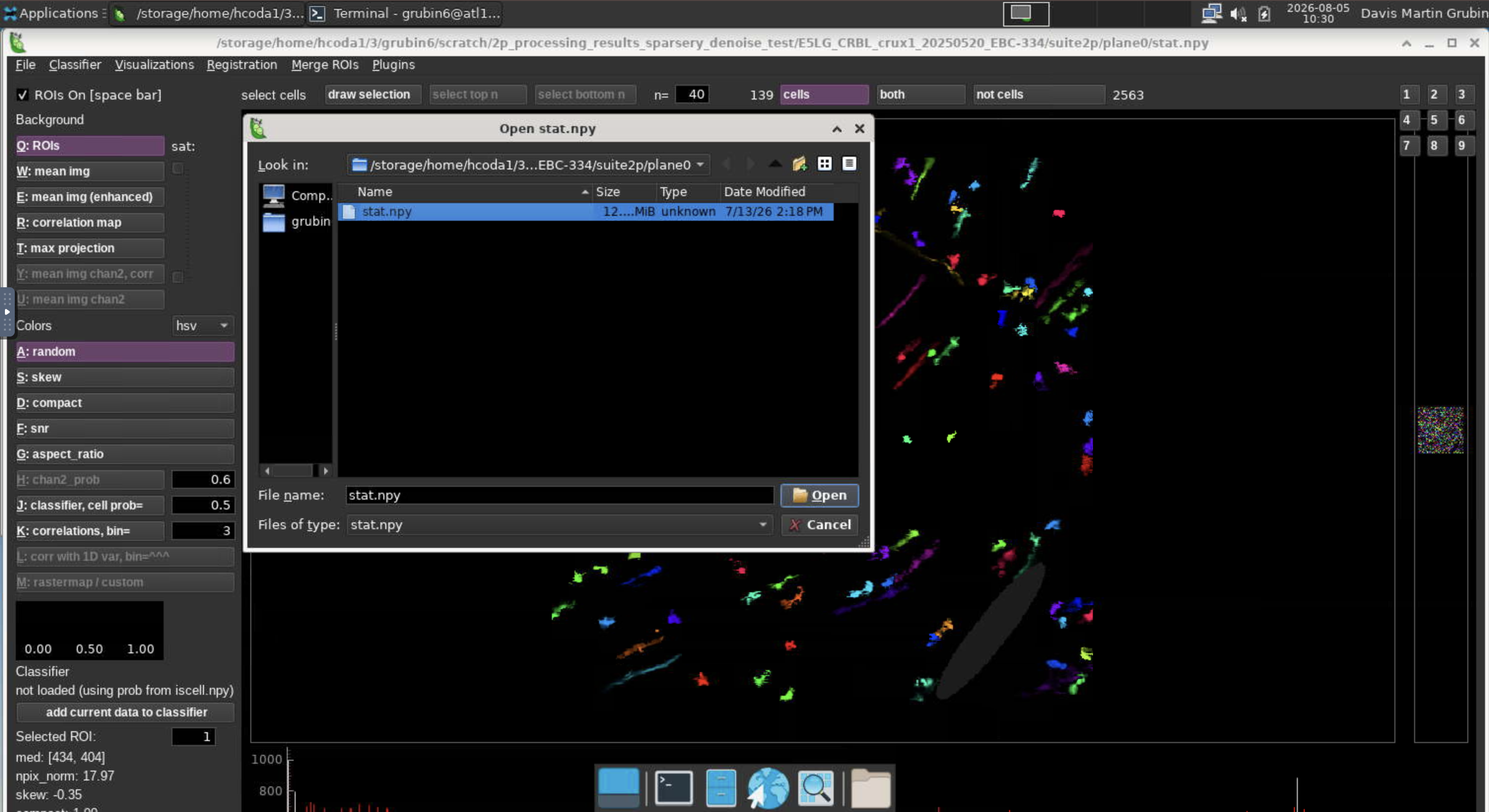
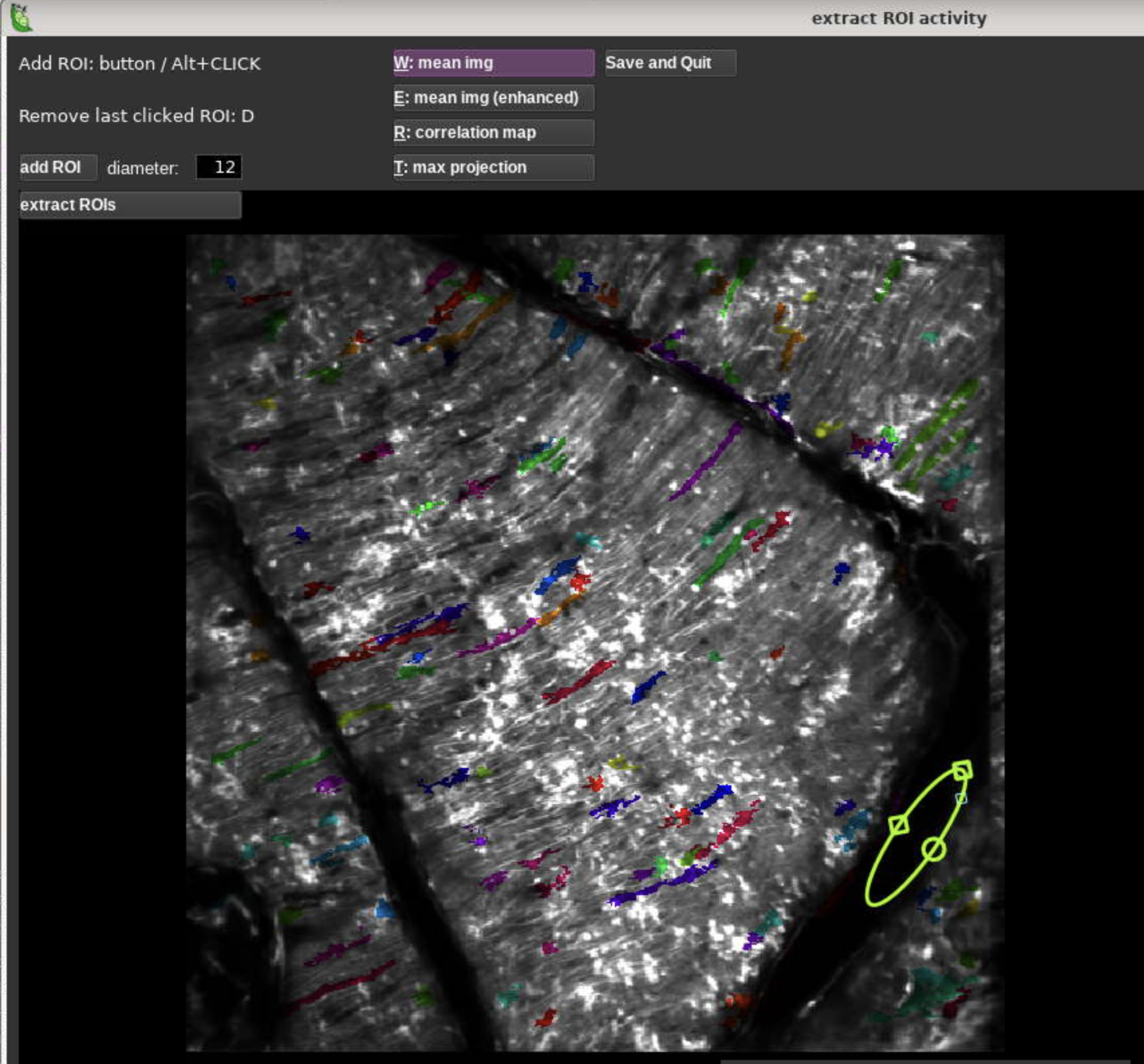
Open the manual ROI drawing menu with File -> Manual labelling -> add ROI. Suite2p opens an oval ROI that can be moved over the target region, resized, and rotated to cover the selected area. If the target region is irregular, draw multiple simpler ROIs; they can be merged later so downstream analysis uses the average activity across the merged ROI set. Multiple ROIs can be added before running extraction, and it is usually more efficient to add all planned manual ROIs in one pass because the extraction step can take a while to run.
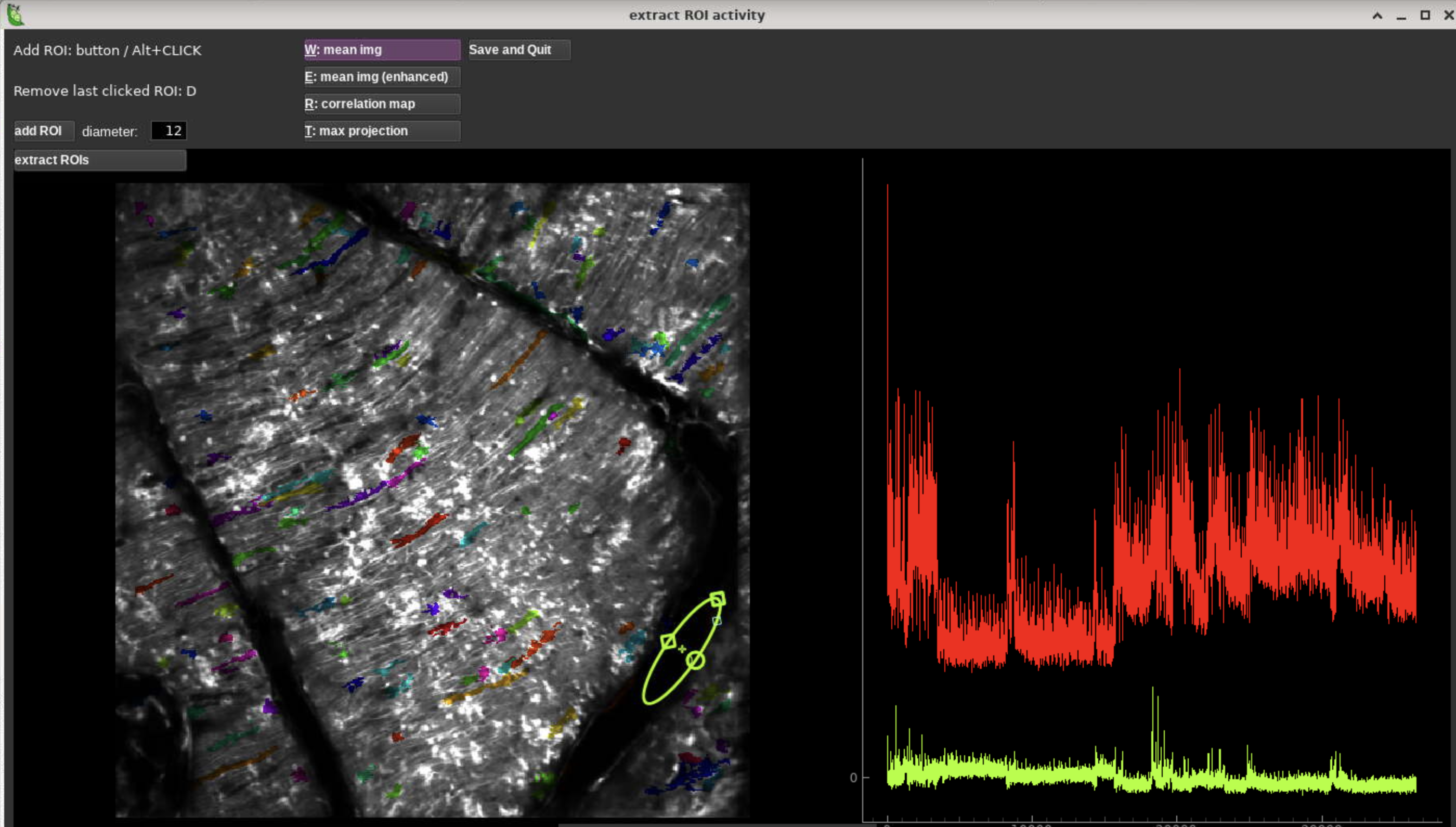
After all planned ROIs have been added, click Extract ROI once and wait for the extraction step to finish. This can take 10-15 minutes, so be patient and avoid clicking additional controls or making further edits while extraction is running. The Extract ROI button switches to extracting... while it runs. When the screen looks like the following image, extraction is complete and you can click Save and quit.
Editing the original Suite2p folder
For a normal Suite2p output folder, open:
/path/to/session/suite2p/plane0/stat.npy
Suite2p's manual ROI GUI updates files in that same folder. Observed files that can change after extracting and saving a manual ROI include:
stat.npystat_orig.npyiscell.npyF.npyFneu.npyspks.npy
stat_orig.npy is created by Suite2p the first time manual ROI edits are saved.
It records the pre-edit stat.npy and is used by
remove_all_manual_rois() to detect and remove manual additions later.
Suite2p's manual ROI GUI prepends new manual ROIs before the original Suite2p
ROIs when it saves stat.npy, iscell.npy, F.npy, Fneu.npy, and spks.npy.
That means adding N manual ROIs shifts original Suite2p ROI i to row
i + N. This is inconvenient for cross-session cell matching done before QC,
because those matching outputs usually refer to the original Suite2p ROI rows.
Move manual ROIs after original Suite2p ROIs
Use this after saving manual ROIs in the Suite2p GUI when you want to keep the manual additions but restore stable original Suite2p indexing for downstream QC and cell matching.
Preview the reorder:
python - <<'PY'
from utils_2p.manual_rois import move_manual_rois_to_end

result = move_manual_rois_to_end(
    "/path/to/session/suite2p/plane0/stat_orig.npy",
    "/path/to/session/suite2p/plane0/stat.npy",
    dry_run=True,
)
print(result)
PY
Apply the reorder with backups:
python - <<'PY'
from utils_2p.manual_rois import move_manual_rois_to_end

result = move_manual_rois_to_end(
    "/path/to/session/suite2p/plane0/stat_orig.npy",
    "/path/to/session/suite2p/plane0/stat.npy",
)
print(result)
PY
After this step, ROI-indexed Suite2p arrays are ordered as:
rows 0..N_original-1       original Suite2p ROIs, original row index preserved
rows N_original..end       manual-added ROIs
The helper updates row-aligned arrays in the same folder when present:
stat.npyiscell.npyF.npyFneu.npyspks.npyF_chan2.npyFneu_chan2.npyredcell.npy
It also writes suite2p_roi_index_mapping.csv with these columns:
| Column | Meaning |
|---|---|
current_row |
Row after reordering; this is the row used by the current stat.npy, F.npy, Fneu.npy, and other row-aligned arrays. |
roi_origin |
suite2p_detected for original Suite2p ROIs or manual_added for ROIs drawn in the Suite2p GUI. |
suite2p_original_index |
Original Suite2p ROI index for pre-QC matching. Blank for manual-added ROIs. |
manual_roi_index |
Manual ROI index in draw/save order. Blank for original Suite2p ROIs. |
previous_row |
Row before reordering, useful for auditing what Suite2p GUI wrote. |
For downstream QC and Gary-style cell matching, join pre-QC matching outputs to
QC labels or traces using suite2p_original_index. Use current_row only when
indexing into the current reordered arrays. Manual-added ROIs do not have a
pre-QC Suite2p match unless a separate manual matching workflow assigns one.
Export a temporary workspace back to QC names
After adding, extracting, and saving the manual ROI in the GUI, export the workspace back to the older QC folder:
python - <<'PY'
from utils_2p.manual_rois import export_manual_roi_workspace

result = export_manual_roi_workspace(
    workspace_dir="/path/to/session/manual_roi_workspace",
    qc_dir="/path/to/session/manual_qc_results",
    cleanup_workspace=True,
)
print(result)
PY
By default, export does the following:
- copies
workspace/stat.npyback toqc_dir/stat.npy - copies
workspace/F.npyback toqc_dir/fluo.npy - copies
workspace/Fneu.npyback toqc_dir/neuropil.npy - regenerates
qc_dir/masks.npy - leaves non-Suite2p derived outputs untouched
- writes a stale-output manifest when derived outputs such as
dff.h5,denoised_dff.h5, orspikes.h5exist - creates backups before overwriting existing files
- removes the workspace if
cleanup_workspace=True
The helper is intentionally conservative: it updates only the Suite2p/QC-aligned ROI files and masks by default. Experiment-specific or downstream files should be regenerated by their owning analysis step only when that workflow explicitly needs them.
Remove all manual ROIs from a Suite2p folder
Use this when the current stat.npy has manual ROI additions and
stat_orig.npy still represents the original pre-edit ROI set.
Preview the changes:
python - <<'PY'
from utils_2p.manual_rois import remove_all_manual_rois

result = remove_all_manual_rois(
    "/path/to/session/suite2p/plane0/stat_orig.npy",
    "/path/to/session/suite2p/plane0/stat.npy",
    dry_run=True,
)
print(result)
PY
Apply the cleanup with backups:
python - <<'PY'
from utils_2p.manual_rois import remove_all_manual_rois

result = remove_all_manual_rois(
    "/path/to/session/suite2p/plane0/stat_orig.npy",
    "/path/to/session/suite2p/plane0/stat.npy",
)
print(result)
PY
The cleanup removes the matching ROI rows from row-aligned arrays in the same
folder, including iscell.npy, F.npy, Fneu.npy, and spks.npy when they
exist.
Regenerate downstream outputs
If downstream files were generated from older ROI inputs, regenerate them after manual ROI edits. Examples include:
- summary HTML/PDF reports
- trialized neural response files
- event detection outputs
- onset detection outputs
- model input tables or cached arrays
Do not regenerate experiment-specific files as part of the generic manual ROI export unless the project-specific workflow explicitly asks for it. Keep that postprocessing separate from the Suite2p manual ROI cleanup step.
Implementation notes
The utility functions live in:
utils_2p/manual_rois.py
Public functions:
remove_all_manual_rois(stat_orig_path, stat_path, ...)move_manual_rois_to_end(stat_orig_path, stat_path, ...)create_manual_roi_workspace(qc_dir, suite2p_plane_dir, workspace_dir, ...)export_manual_roi_workspace(workspace_dir, qc_dir, ...)
Tests live in:
utils_2p/tests/test_manual_rois.py